
Your audience can talk with each other, ask your team questions and vote in polls, on the same page as the captions. Messages and questions are translated for each reader, with See original to read what was written.
Turn on chat for your workspace
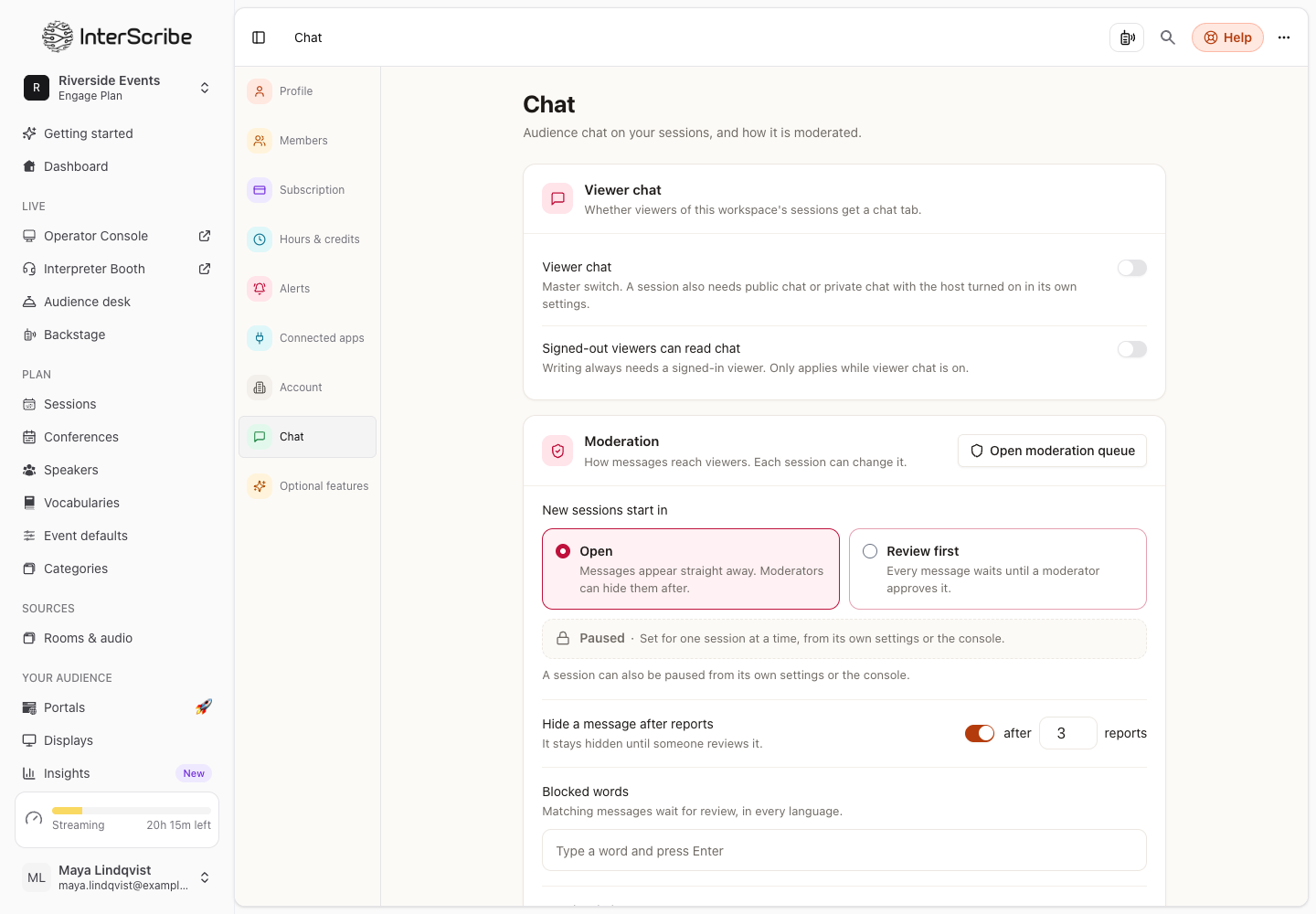
- STEP 1Open chat settingsGo to Settings › Chat.
- STEP 2Turn on viewer chat
Turn on Viewer chat. This is the master switch: a session also needs chat turned on in its own settings.
- STEP 3Decide who can read
Signed-out viewers can read chat lets people read without signing in. Writing always needs a signed-in viewer.
- STEP 4Set moderation defaults
Under Moderation, choose where New sessions start in: Open (messages appear straight away; moderators can hide them after) or Review first (every message waits until a moderator approves it). Add Blocked words, and set Hide a message after reports.
Workspace admins, and each session's Operators and Moderators, can moderate.
Turn it on for a session
In the session's settings, open Chat, Q&A, polls & church tools:
- Audience chat: viewers chat with each other on the event page.
- How messages appear: keep the workspace default, or choose Open, Review first or Paused (read-only) for this session.
- Slow mode: how long each viewer waits between messages.
- Who may speak in chat: who can write. Reading stays open to everyone.
- Q&A: viewers send questions for your team to answer. You can Review questions before showing them, Allow anonymous questions or Require sign-in to ask.
- Polls: viewers vote in polls your team launches.
Moderate during the session
Open Audience desk under Respond in the sidebar. A session can also be paused from its own settings or the Console; while paused, viewers can read but not write.
What listeners see
- Chat: the public conversation. The first time they write, listeners choose a Chat name, the name everyone sees next to their messages.
- Q&A & Polls: questions sorted by Popular, Recent or Mine, with upvotes, and the live poll.
- Each message has Report message and Hide this person's messages. A reported message is hidden for the reporter right away, and the author is not told who reported it.
- The chat opens before the session and closes some minutes after it: the page shows Chat closes n minutes after the session. After the session, a replay shows Chat from the live session, read-only.