
You need what was said written down, in more than one language.
AI transcription for live sessionsAI transcription that writes the talk as it happens, in every language.
Speech recognition writes what is said while the speaker talks. Guests read it on their phones, and when the session ends each language is a transcript you can read or download, SRT included.
- Captions in 100+ languages
- A transcript in every language
- Included in every plan

Speaker, in English
“Welcome, everyone. Let's begin.”
See a sample
Read the talk as it is spoken.
A sample: an English talk, written in Portuguese as the speaker talks, with the English the speaker said under it.
Live transcripts and captions in 100+ languages are in every plan. When the session ends, each language is a transcript to read or download.
Sample · an English talk, heard in Portuguese
English speaker, Portuguese transcript
Transcript, as it is writtenPT
Bom dia a todos. Obrigada por se juntarem a nós hoje na Cúpula de Inovação em IA.
Good morning, everyone. Thank you for joining us today at the AI Innovation Summit.
Picture this
A lecture at ten, the transcript by lunch.
For example
10:00
Dr. Okafor starts a lecture on contract law, in English. Half the class is still learning the language.
10:02
Students open the QR code on the slide and read along on their phones, each in the language they read best.
11:30
The lecture ends. Every language that was used has its own transcript, ready to read or download.
12:15
Priya missed the first half. She reads the whole lecture in her language over lunch.
 Português · captionsreading on the phone
 Read along · captions
For the listener
From the first word to the full text.
The same QR code serves the room and anyone watching online. Guests read along live, and keep the words afterwards.
Step 1
Scan the QR code
On the screen, a poster or the seat card. The guest page opens in the browser. No app, no account.
Step 2
Pick their language
Each language is listed in its own name, so they know what they will read.
Step 3
Read along, make the text bigger
The words appear as the speaker talks. They choose the language and the text size, and scroll back to a line they missed.
For the organiser
You decide which languages are offered, and when the session starts.
Everything runs from the operator console your sound desk already uses for captions.
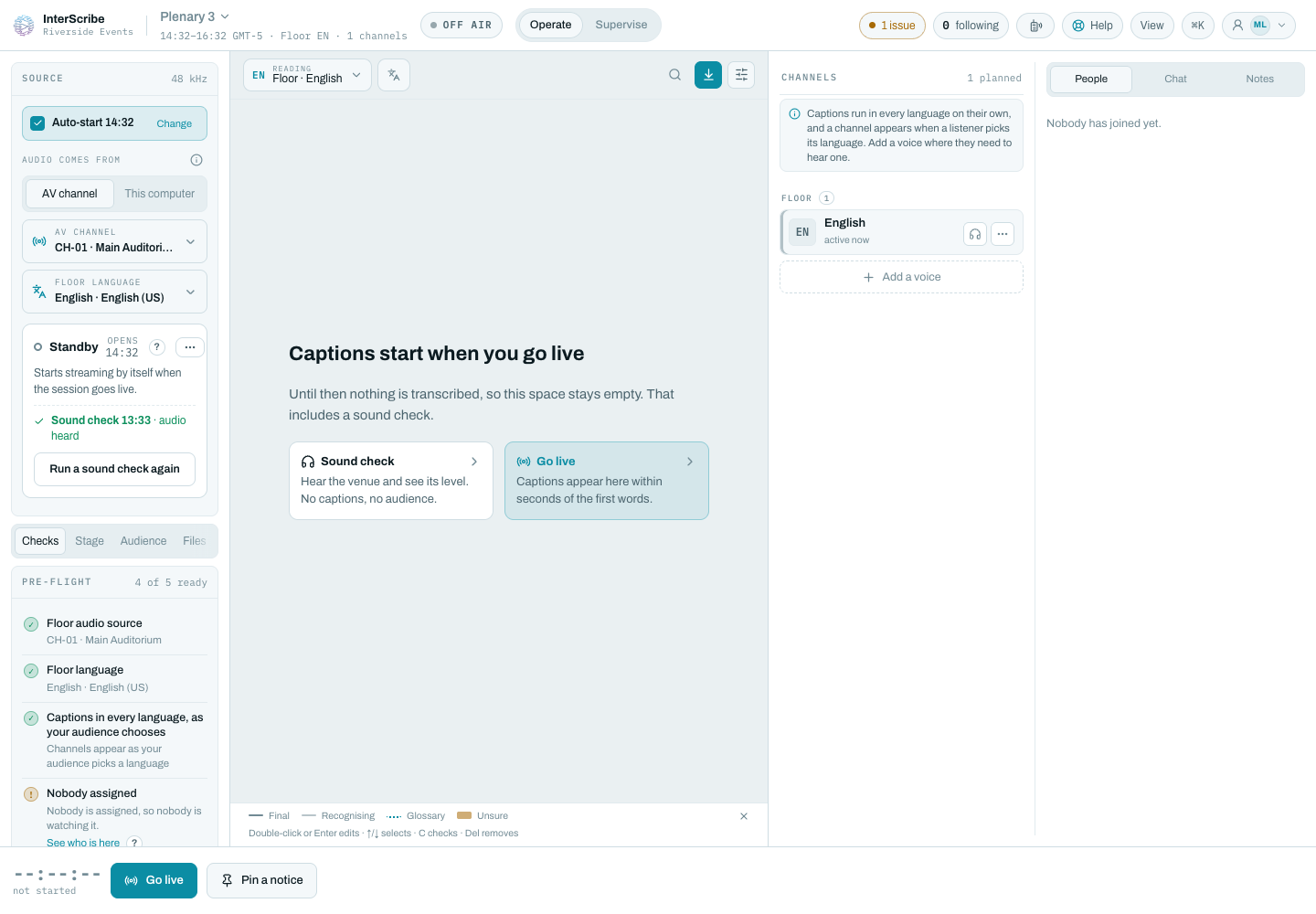
- Add a language per channel
- Go live: captions start
- Who is listening
Languages, one by one
Captions run in every language on their own. Add a language where your guests need one.
One button to start
Go live, or let standby start it at the session's time after a sound check.
See who is listening
A count per language, so you know which languages are being read.
How guests join
One QR code. Every guest reads in the language they pick.
Guests scan the code on a screen, a poster or a seat card, choose a language and read along on the phone they brought. Nobody installs anything.
- 한국어Captions
- EspañolCaptions
- PortuguêsCaptions
- Every other languageCaptions
Example. Languages are illustrative.
How live captioning works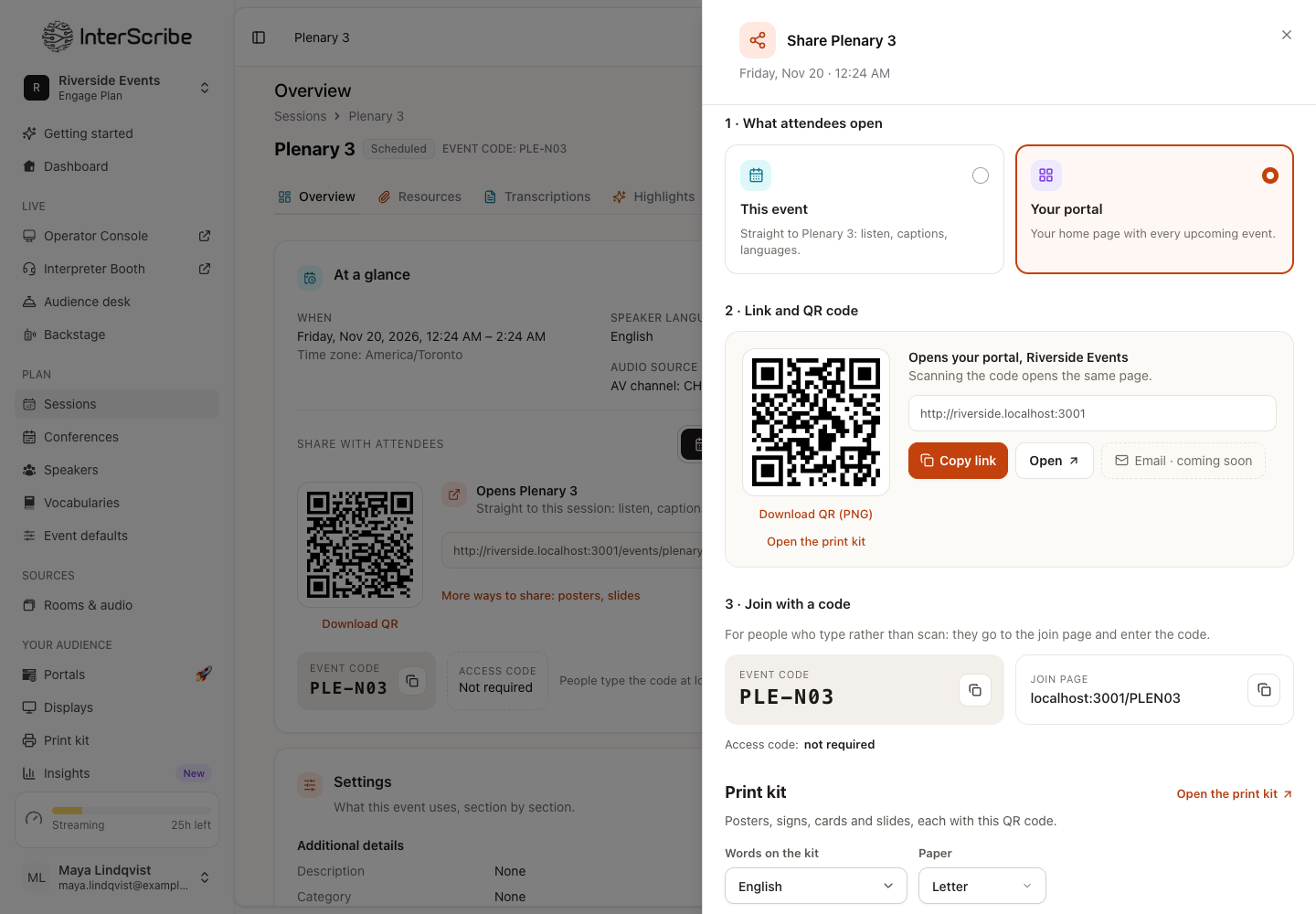
- The QR to print once, from Your portal
- A code for people who type
Good to know
Live speech today, recorded video next.
Live, while they speak
Keynotes, services, lectures and town halls, in the room and online through the same link.
Afterwards, the words in every language
Download the transcript in each language, an SRT file for your recording and an AI summary.
Recorded videos: being built
Today InterScribe transcribes sessions you run through it, live. It cannot yet transcribe a recording you upload or link. Transcribing recorded videos is being built, starting with YouTube.
What is AI transcription?
Software that turns speech into written text. InterScribe transcribes live: the words appear on guests' phones as they are spoken, and the full text is kept for you after the session in each language that was used.
Can I download the transcript?
Yes. When the session ends, each language that was used has its own transcript to read or download, with an SRT file.
How accurate is the transcript, and where does it miss?
Often good, never perfect. Names, places and unusual terms are the usual misses, so add them to a vocabulary before the day, test with your real speaker, and read the transcript before you publish it.
Can it transcribe a recording I upload?
Not yet. InterScribe transcribes sessions you run through it. Transcribing recorded videos is being built, launching later in 2026.
In how many languages?
Captions and transcripts are available in 100+ languages on every plan. The speaker's words are written first, then translated into each language a guest picks.
Do guests need an app or an account?
No. They scan a QR code or open a link in their phone’s browser. Nothing to install, and no account needed to read or listen.
Will it get names and technical terms right?
Often, with help. Add speakers, places and your own terms to a vocabulary before the day. AI can still get names, quotations and jokes wrong, so test with your real speaker.
Get every session written down, in every language.
Hear a sample first. Then price your rooms and hours.
Photos: Tsuyoshi Kozu and Vitaly Gariev on Unsplash