
Cómo se compara InterScribe.
Wordly, KUDO, Interprefy, LiveVoice, OneAccord, lado a lado en lo que los compradores preguntan en una demostración: cuánto cuesta realmente una hora, cómo escucha la gente, quién aporta los intérpretes. Una hora de InterScribe cubre todos los idiomas de subtítulos a la vez, y las cuentas de abajo muestran lo que eso vale. Incluido dónde son mejores los demás.
- Datos comprobados el 7 de octubre de 2026
- 5 proveedores · 10 fuentes
- Desde 11,88 US$ la hora, todos los idiomas incluidos
Conferencia, en inglés
Los buenos equipos no empiezan con un plan. Empiezan con confianza.
Escrito por InterScribe, así que no somos neutrales. Cada dato sobre otro proveedor viene de su propia web y nombra el día en que lo leímos. Compara el precio por hora
Precio por hora, comparado con justicia
Una hora cubre todos los idiomas. Esto es lo que cuesta realmente una hora.
Desde 11,88 US$ la hora (el más bajo de nuestros planes al precio para iglesias y organizaciones sin fines de lucro, con facturación anual, usando las 25 horas). La página de cada proveedor hace las cuentas frente a ese proveedor.
11,88 US$ la hora
Engage, precio para iglesias, anual
499 US$ × 0,70 × 0,85 = 296,90 US$ al mes ÷ 25 h
15,35 US$ la hora
Community, precio para iglesias, anual
129 US$ × 0,70 × 0,85 = 76,75 US$ al mes ÷ 5 h
19,96 US$ la hora
Engage, precio de lista
499 US$ al mes ÷ 25 h
Dos formas de comprar InterScribe
Un plan mensual si os reunís cada semana. Horas que pagas una vez si no. Los subtítulos y la traducción en todos los idiomas admitidos están en cada hora, en ambas.
Planes mensuales
Precio de lista, por mes
| Plan | Precio | Horas de evento | Horas de voz de IA | Por hora |
|---|---|---|---|---|
| Community | 129 US$ | 5 | 0 | 25,80 US$ |
| Launch | 349 US$ | 15 | 5 | 23,27 US$ |
| Engage | 499 US$ | 25 | 20 | 19,96 US$ |
| Elevate | 997 US$ | 50 | 50 | 19,94 US$ |
Deslice hacia los lados para ver todas las columnas.
El precio para iglesias u organizaciones sin fines de lucro y la facturación anual se combinan. Engage pasa a 296,90 US$ al mes: 11,88 US$ la hora.
Pago único, sin plan
Por tamaño de público, por hora
- Hasta 250 personas
- 45 US$ la hora
- Hasta 1000 personas
- 55 US$ la hora
- Hasta 5000 personas
- 70 US$ la hora
- Hora de voz de IA
- 18 US$ la hora
Iglesias u organizaciones sin fines de lucro −30 %: 31,50 US$ la hora hasta 250 personas.
Las horas que compras por adelantado se pueden usar durante 12 meses. Comprar más de una vez descuenta una parte de toda la compra: 10 h −10 %, 25 h −20 %, 50 h −30 %.
45 US$ × 0,70 = 31,50 US$, −30 % por 50 h = 22,05 US$ la hora
- 10 h, iglesias: 28,35 US$ la hora
- 50 h, iglesias: 22,05 US$ la hora
Nuestros precios son precios de lista en dólares estadounidenses, leídos de nuestras tarifas el día en que se construye la página; los de la competencia son los publicados en sus sitios en la fecha que figura con cada fuente; tu presupuesto puede variar. Las cifras por hora suponen que se usan todas las horas incluidas.
Lado a lado
Las preguntas que hacen los compradores, respondidas desde la web de cada proveedor.
«No publicado» significa que no lo encontramos en la web del proveedor el 7 de octubre de 2026. Puede que exista: pregunta en la demostración.
| Pregunta | InterScribe | Wordly | KUDO | Interprefy | LiveVoice | OneAccord |
|---|---|---|---|---|---|---|
| Precio publicado | Engage cuesta 499 US$ al mes con 25 horas de evento, unos 19,96 US$ la hora con uso completo. Los subtítulos en todos los idiomas compatibles están incluidos. | Starts at about $1,500 for a 10-hour package, usable for 12 months. Nonprofit and education discount of 10% on Pro and above.2 | No public prices. Plans are Marketplace (book interpreters), Pay as you go, and Annual from 50 hours a year.4 | Custom pricing with annual hour bundles; unused hours do not roll over.6 | Precio no comparado aquí | $150 a month for 5 hours (one service a week), with a free trial and no setup fee.9 |
| Cómo se compra | Los precios de los planes están publicados en la página de precios. Un evento puntual se presupuesta según sus horas, salas e idiomas. | Get a demo, Try it now, or Buy online. Says it activates within 5 to 10 minutes after purchase.12 | No publicado | No publicado | Self-serve: Start for free.7 | No publicado |
| Idiomas | Voz con IA en 89 idiomas. Subtítulos en todos los idiomas compatibles. | 60+ languages and 3,000+ language pairs, with voice, captions, transcripts and summaries.1 | AI in 70+ languages, and 200 spoken and signed languages in all.3 | 150 languages.5 | No publicado | 50+ languages, with voice and text.9 |
| Voz con IA | Voz natural con IA en 89 idiomas, y además voz del dispositivo (el teléfono lee los subtítulos en voz alta) en todos los planes. Sus propios intérpretes no usan horas de voz con IA. | Voice in 60+ languages.1 | AI interpretation in 70+ languages.3 | AI speech translation.5 | No publicado | Voice and text in 50+ languages.9 |
| Intérpretes humanos | Sus propios intérpretes en una cabina en el navegador, combinados con voz con IA por idioma. Puestos de cabina desde Engage. | No publicado | 12,000+ human interpreters, plus AI interpretation.3 | Human interpreters and AI speech translation on one platform, with failover between them.5 | Human interpreters, AI, or both.7 | No publicado |
| ¿Hace falta una app para escuchar? | No. El código QR o el enlace se abre en el navegador del teléfono. | No publicado | No publicado | No publicado | No publicado | No publicado |
| ¿Incluye cabina de intérpretes? | Sí, en el navegador, en el lugar o desde casa. Puestos de cabina desde Engage. | No publicado | No publicado | No publicado | No publicado | No publicado |
| Funciona con | El audio entra por el navegador o por el emisor de escritorio. Subtítulos en las pantallas de ProPresenter. | Zoom, Teams, Meet, Webex, Cvent and Encore.1 | No publicado | 80+ platform integrations.5 | No publicado | ProPresenter, OBS, Bitfocus Companion and Stream Deck.9 |
Deslice hacia los lados para ver todas las columnas.
Los datos de los proveedores se leyeron en la web de cada uno, la última vez el 7 de octubre de 2026, y están redactados como los redacta el proveedor. Las cifras de InterScribe salen de nuestras tarifas vigentes.
Voz de IA
Escucha la diferencia antes de comprar.
Una hora es larga. Una voz que sigue el ritmo del orador se escucha bien durante toda la hora; una que lee las palabras de una en una cansa al minuto diez. Algunas herramientas llaman «voz» al texto a voz. Escucha antes de comprar.
Voz de IA
Ritmo natural
Las frases fluyen, las pausas caen donde el orador pausó y una pregunta suena a pregunta. InterScribe: una voz natural en 89 idiomas.
El texto a voz integrado del teléfono
Ritmo robótico
Lee los subtítulos palabra por palabra con un tono uniforme, con la voz que tenga el teléfono. Aun así es útil: InterScribe lo incluye como voz del dispositivo en todos los planes, sin coste extra.
Pide a cualquier proveedor que te reproduzca su voz en tu idioma antes de comprar.
Escucha una muestra
Una muestra real grabada: una charla en inglés, con la voz de la página que usaría tu audiencia. Elige un idioma y escucha el ritmo.
Más idiomasUno por uno
Quién debería elegir qué.
Cada uno tiene su página de comparación completa y una página de alternativas ordenada por adecuación, no con nosotros primero.
Wordly
From about $1,500 for 10 hours2
Meetings and events for businesses, associations, government, education and houses of worship, bought through a demo or online.
Elige Wordly si
you want to start with a demo, or to buy a package online and be running within minutes
Elige InterScribe si
you want chat, Q&A and polls for your audience on the same page as the captions
InterScribe frente a WordlyAlternativas a WordlyKUDO
Price on request4
Organisations that want to book human interpreters through a large marketplace.
Elige KUDO si
you want to book professional interpreters through the vendor, from a pool of 12,000+
Elige InterScribe si
you already have interpreters, or your community does, and want them in a browser booth
InterScribe frente a KUDOAlternativas a KUDOInterprefy
Custom quote6
Large events that mix professional interpreters with AI and want a custom quote.
Elige Interprefy si
you need one of its 80+ platform integrations
Elige InterScribe si
you want a monthly plan price you can read before any conversation
InterScribe frente a InterprefyAlternativas a InterprefyLiveVoice
Small or occasional events that want to pay by the day or the minute.
Elige LiveVoice si
you run an occasional small event and want to pay by the day or by the minute
Elige InterScribe si
you want chat, Q&A and polls for your audience on the same page as the captions
InterScribe frente a LiveVoiceAlternativas a LiveVoiceOneAccord
$150 a month for 5 hours9
Churches with a weekly service that want one monthly price.
Elige OneAccord si
you are a church with one weekly service and want a single monthly price
Elige InterScribe si
you want chat, Q&A and polls for your audience on the same page as the captions
InterScribe frente a OneAccordAlternativas a OneAccordSolo intérpretes humanos
Sin plataforma
Para entornos legales, médicos y diplomáticos donde se exigen intérpretes certificados. Si tus intérpretes necesitan una cabina y un público que los oiga en su teléfono, ahí entramos nosotros.
Cómo funciona la cabina de intérpretes
Imagina
Tres demostraciones, una hoja de cálculo.
Por ejemplo
Martes, 14:00
Dana organiza un congreso regional con un itinerario en francés y otro en portugués. Tiene tres demostraciones de proveedores esta semana, y su hoja de comparación ya se contradice: un precio es por hora, otro por día, otro «a consultar».
Miércoles
Así que deja de comparar listas de funciones y hace a cada proveedor las mismas preguntas, en el mismo orden.
Viernes
Las respuestas que deciden son las del precio por idioma, quién aporta los intérpretes y si puede escuchar antes la voz en los idiomas de sus ponentes.

Antes de firmar
Preguntas para cualquier proveedor en una demostración.
Incluidos nosotros. Ve tachándolas.
- ¿Cómo entra un oyente? ¿Necesita una aplicación, una cuenta o solo la cámara de su teléfono?
- ¿Qué idiomas tienen voz y cuáles solo subtítulos? Pide tu lista exacta, no el total.
- ¿Podemos usar nuestros propios intérpretes? ¿Dónde se sientan, qué necesitan y puede la IA cubrir al mismo tiempo los demás idiomas?
- ¿Cuál es el precio por qué? ¿Por hora, por día, por idioma, por oyente, por sala? ¿Qué pasa con las horas que no usamos?
- ¿El precio es por idioma o por todos los idiomas? Cinco idiomas a precio por idioma cuestan cinco veces uno.
- ¿La voz es de IA o es el texto a voz del teléfono? Pide que la reproduzcan en tu idioma y decide.
- ¿Cómo entra el audio? ¿Desde nuestra mesa de sonido, un navegador o una herramienta de reuniones? ¿Quién lo configura el día del evento?
- ¿Cómo le enseñamos nuestros nombres y términos? Oradores, lugares, nombres de productos, antes del día.
- ¿Qué recibimos después? ¿Transcripciones en qué idiomas y formatos, y un resumen?
- ¿Podemos oírlo antes con nuestro propio contenido? Una grabación de tu orador dice más que una demostración pulida.
Nuestras respuestas están en nuestras propias páginas: precios · intérpretes · una muestra que puedes oír
- En la llamada · el mismo enlace
- En la sala · código QR
Zoom, Teams y Meet
¿Usas una herramienta de reuniones? Quédate con ella.
InterScribe funciona junto a tu herramienta de reuniones, no en su lugar. Quienes están en la llamada abren el enlace de la sesión junto a la reunión; quienes están en la sala escanean el código QR. Todos siguen los mismos subtítulos, voces e intérpretes.
- La sala, la transmisión y la llamada siguen una sola sesión.
- Subtítulos en más de 100 idiomas, voz de IA o tus propios intérpretes.
- Cada oyente elige un idioma en su propio teléfono o portátil.
Intérpretes humanos e IA
¿Personas o IA? Las dos, en una sola lista.
Varios proveedores venden o un mercado de intérpretes o IA. Con InterScribe tus propios intérpretes trabajan desde la cabina en un navegador, en el lugar o desde casa, y la voz de IA y los subtítulos cubren todos los idiomas para los que nadie está contratado.
- Português · Intérprete
- Español · Intérprete
- Français · Voz de IA
- Todos los demás idiomas · Subtítulos
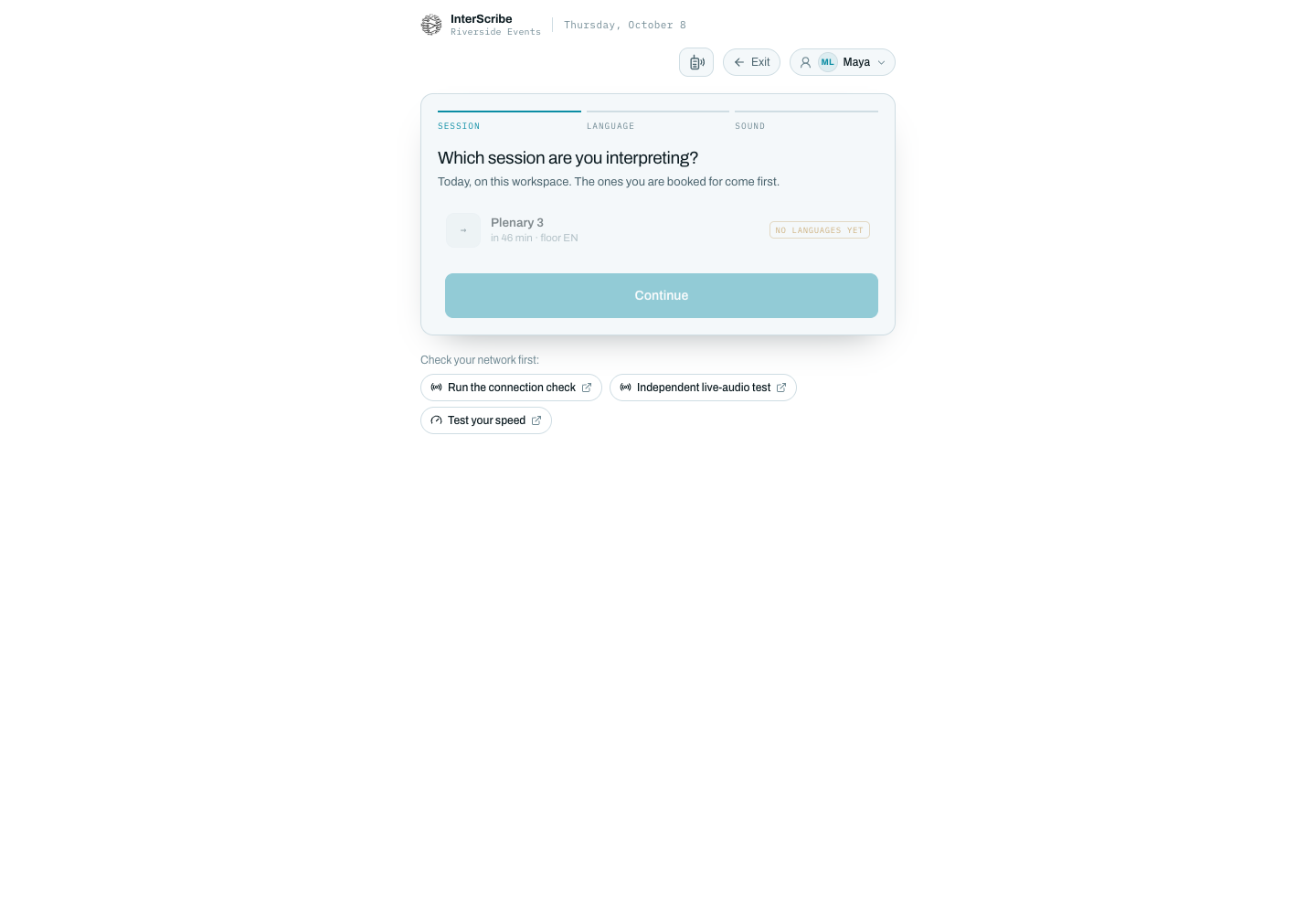
- Tres pasos: sesión, idioma, sonido
- Elija la sesión
- Revise primero la red
Fuentes
¿Algo desactualizado? Avísenos
- Wordly home page, leído el 7 de octubre de 2026
- Wordly pricing, leído el 7 de octubre de 2026
- KUDO home page, leído el 7 de octubre de 2026
- KUDO plans and features, leído el 7 de octubre de 2026
- Interprefy home page, leído el 7 de octubre de 2026
- Interprefy pricing, leído el 7 de octubre de 2026
- LiveVoice home page, leído el 7 de octubre de 2026
- LiveVoice pricing, leído el 7 de octubre de 2026
- OneAccord home page, leído el 7 de octubre de 2026
- OneAccord, our story, leído el 7 de octubre de 2026
No enlazamos a otros proveedores. Busca el nombre del proveedor para leer las mismas páginas.
¿Preguntas sobre cómo comparar? Pregúntanos.
Habla con una persona¿Por qué no enlazan a los otros proveedores?
Estas páginas son nuestra lectura de sus webs. Cada fuente nombra la página y el día en que la leímos, para que puedas encontrar la misma página buscando el nombre del proveedor. Los precios y las funciones cambian; comprueba los suyos antes de decidir.
¿Cada cuánto comprueban estos datos?
Cada dato nombra el día en que se leyó. Una comparación cuyos datos tienen más de seis meses pide a los buscadores que la dejen fuera hasta que volvamos a leer las páginas.
¿Qué significa «No publicado»?
No encontramos la respuesta en la web del proveedor el día en que la leímos. Puede que exista: pregunta en la demostración.
¿Es InterScribe más barato?
Depende de lo que compres. Una hora cubre todos los idiomas de subtítulos, así que la diferencia crece con cada idioma que añades. La página de cada proveedor hace las cuentas frente a ese proveedor. Si no publica precio, pide un presupuesto y ponlo junto al nuestro.
¿Podemos probar InterScribe junto a nuestro proveedor actual?
Sí. Habla con nosotros y prepararemos una prueba con una grabación de tu propio orador, para que compares en tu propio teléfono.
Compara nuestro precio con el presupuesto que tienes.
Calcula un precio con tus horas, salas e idiomas. Lleva un minuto.
Fotos: Danny Perez y Filip Rankovic Grobgaard en Unsplash